Refunds for Mobile Game Purchases: How the Process Generally Works
Accidental or unauthorised in-app purchases can sometimes be refunded. How refund requests generally work on Apple and Google Play, and how to prevent the problem.
Accidental purchases happen: a child taps a bundle, an item does not arrive, or a purchase is made without permission. Both major app stores have a refund process, although refunds are not guaranteed and policies can change. This guide explains the general approach and, just as importantly, how to prevent accidental purchases in the first place.
First, check what happened
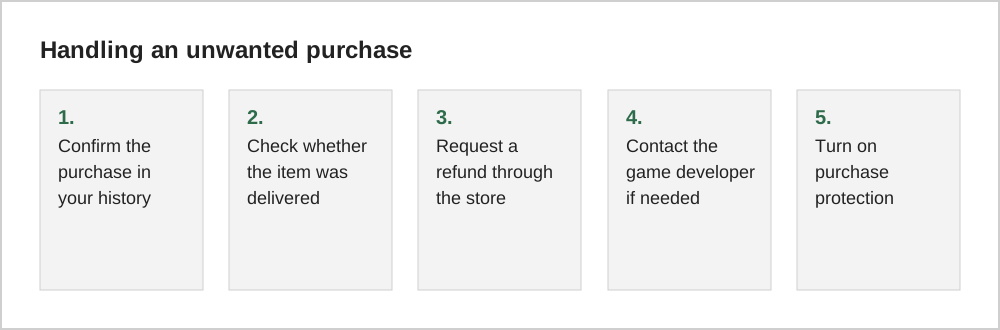
Before requesting a refund, check your purchase history to confirm what was bought, when and on which account. On Apple devices, purchase history is in your account settings; on Google Play, order history is in the account section of the Play Store. Also check whether the item actually arrived in the game, since some issues are solved by the game's own support.
Apple App Store
For purchases made through Apple, refund requests are generally submitted through Apple's "Report a Problem" website (reportaproblem.apple.com), where you sign in, choose the reason, and select the purchase. Apple reviews each request. Check Apple's support pages for the current process and any time limits.
Google Play
Google Play's help pages describe a refund process for Play purchases. For some purchases made very recently, you may be able to request a refund directly through Google Play; after that, Google generally directs you to contact the developer, with separate options for reporting unauthorised charges. Check the current Google Play help pages for exact time limits and conditions.
When to contact the developer
Some issues are best handled by the game itself, for example a purchase that charged you but did not deliver the item. Look for a support or help option in the game's settings menu, and include your purchase receipt or order number.
| Problem | Best first step |
|---|---|
| Item not delivered | Game's in-app support |
| Accidental purchase | Store refund request |
| Unauthorised purchase by a child | Store refund request, then parental controls |
| Unrecognised charge | Check account security, then contact the store |
Prevention is easier than refunds
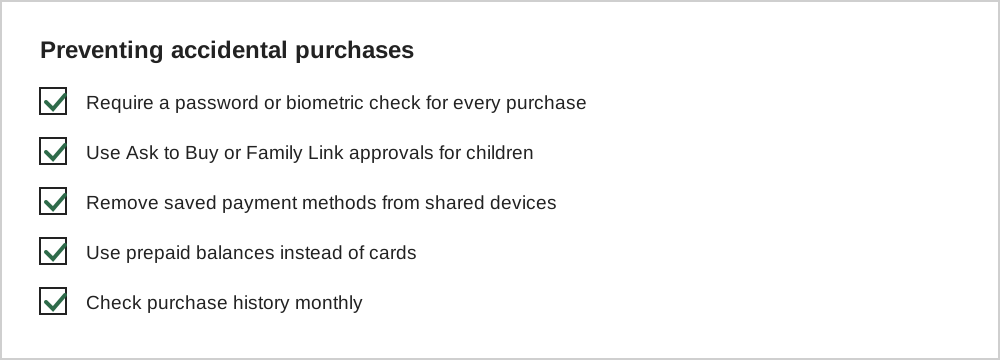
Refund requests are reviewed case by case, and repeated requests may be treated differently. Purchase protections, on the other hand, work every time.
Writing a clear request
Keep a refund request short and factual. State the item, the date, the amount and a reason that fits the store's options, such as an accidental purchase, a purchase made by a child without permission or an item that was never delivered. Avoid long explanations; reviewers handle many requests and clear ones are easier to process.
Include evidence if the form allows it: a screenshot of the purchase receipt, an error message or a note of the order number. Requests made soon after the purchase are generally handled more easily than old ones.
What happens to your game
If a refund is approved, the developer is usually notified and may remove the purchased items. In some games, refunded currency that has already been spent can leave the balance negative or lead to restrictions. This is a reason to request refunds only for genuine problems, and to contact the developer first when an item simply failed to arrive.
Common questions
Will requesting a refund affect my game account?
Some games remove items linked to a refunded purchase, and repeated refund requests may be treated differently by stores and developers. Request refunds only for genuine accidents or problems.
Can I get a refund for currency I already spent?
Policies vary. Stores and developers may treat purchases differently once the currency or item has been used. Explain clearly what happened when making the request, and contact the developer if the store directs you to them.
What information should I include in a refund request?
Include the purchase date, the item name, your order or receipt number, and a short, factual explanation, for example that a child made the purchase without permission or that the item was not delivered.
The short version
Confirm what was purchased, use the store's official refund process, and contact the developer for items that did not arrive. Then turn on purchase authentication and approval tools, because preventing accidental purchases is far more reliable than refunding them.