Modded APKs and Unofficial Downloads: Why the Risk Is Not Worth It
Modified game files promise unlimited currency or unlocked content. Why installing games from outside official stores puts your device, data and accounts at risk.
On Android, it is possible to install apps from files downloaded outside the Google Play Store. Websites offer "modded" versions of popular games that promise unlimited currency, unlocked items or no ads. On iPhone, similar offers appear through unofficial installation methods. These downloads can seem harmless, but they carry real risks.
What a modded game is
A modded game is a copy of a game that someone has altered. The changes might unlock paid content or alter game values. To make those changes, the modder has to repackage the app, which means you are trusting an unknown person with software that runs on your phone.
The main risks
| Risk | What can happen |
|---|---|
| Malware | The file may include code that steals data, shows ads or misuses your phone |
| Account bans | Many online games detect modified clients and ban accounts |
| No updates | Modded versions do not update normally and may stop working |
| Lost progress | Progress may not sync with your real account |
| Privacy | The app may request permissions unrelated to the game |
Why stores matter
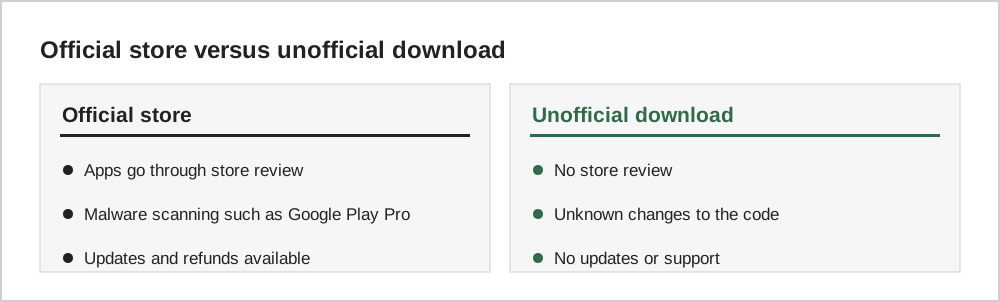
Official app stores review apps and scan for malicious behaviour. On Android, Google Play Protect checks apps for harmful behaviour. Installing apps from other sources requires turning on a permission to install unknown apps, which Android shows a warning about for good reason. No review process is perfect, but bypassing it removes an important layer of protection.
Online games and fair play
In online games, modified clients often violate the terms of service because they give an unfair advantage over other players. Developers commonly use anti-cheat systems, and bans can be permanent, sometimes including any purchases on the account.
If you already installed one
Legitimate alternatives
If the appeal of a modded game is avoiding ads or purchases, consider premium games, a one-time "remove ads" purchase, or a game subscription service, as described in our guide comparing premium and free-to-play games.
How to check what you installed
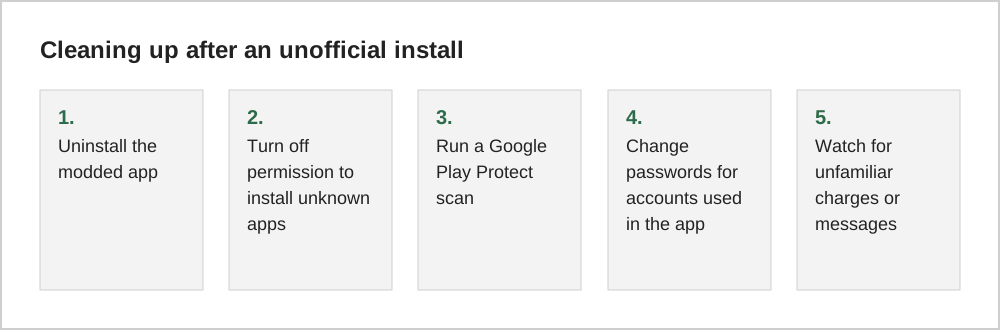
On Android, open Settings, then Apps, and look at the details of each game. Apps installed from the Play Store usually show it as their source, while sideloaded apps may not. Google Play Protect, found in the Play Store menu, can scan installed apps for known harmful behaviour. Running a scan is a sensible first step if you are unsure about something you installed.
Also review which apps are allowed to install unknown apps; this permission is often granted to a browser or file manager during sideloading. Turning it off again closes a door that malicious software could use later.
Why mods attract scams
Searches for free gems or unlocked versions of popular games are common, which makes them attractive to scammers. Many pages promising modded games lead to endless surveys, fake download buttons or apps that request excessive permissions. Some ask for your game account login, which can result in the account being stolen or sold.
Common questions
Are all apps outside the Play Store dangerous?
No. Some legitimate developers and stores distribute apps outside Google Play, and some regions have alternative app stores. The risk comes from modified copies of commercial games, which have been altered by unknown people and often come from websites with aggressive ads. If you do install apps from another source, stick to well-known developers and official websites.
Can a modded game get my main game account banned?
Yes. Many online games detect modified clients and can suspend or permanently ban the account that used them, sometimes including purchases made legitimately. Even single-player games may block cloud saves or online features for modified versions.
Is an antivirus app enough protection?
Security software can catch some threats, but it cannot guarantee that a modified game is safe. The safest approach is not to install modified games at all and to keep the unknown-apps permission switched off.
The short version
Modded and unofficial game downloads bypass store review, can contain malware, and often lead to account bans. Install games from official stores, keep the unknown-apps permission off, and use legitimate ways to avoid ads and purchases.