Age Ratings for Mobile Games Explained: ESRB, PEGI, IARC and App Store Ratings
What mobile game age ratings mean, which systems are used where, and what ratings do and do not tell you about ads, chat and purchases.

Age ratings help you judge whether a game's content is suitable for a particular age. On mobile, several rating systems are in use depending on the store and the region, which can be confusing. This guide explains the main systems and, importantly, what ratings leave out.
The main rating systems
| System | Where it is used | Typical categories |
|---|---|---|
| ESRB | North America | E (Everyone), E10+, T (Teen), M (Mature 17+), AO (Adults Only) |
| PEGI | Europe and some other regions | 3, 7, 12, 16, 18 |
| IARC | Used by Google Play and other storefronts to assign regional ratings | Produces the local rating, such as ESRB or PEGI |
| App Store age ratings | Apple's App Store | Apple's own age bands |
IARC, the International Age Rating Coalition, lets developers answer a single questionnaire that produces ratings for many regions at once. Google Play uses IARC, which is why the same game can show a PEGI rating in Europe and an ESRB rating in the United States.
Apple uses its own age rating bands on the App Store, set through a questionnaire developers complete. Apple updated its age rating system in 2025 to add more age bands, so the exact categories you see depend on your software version and region.
What ratings measure
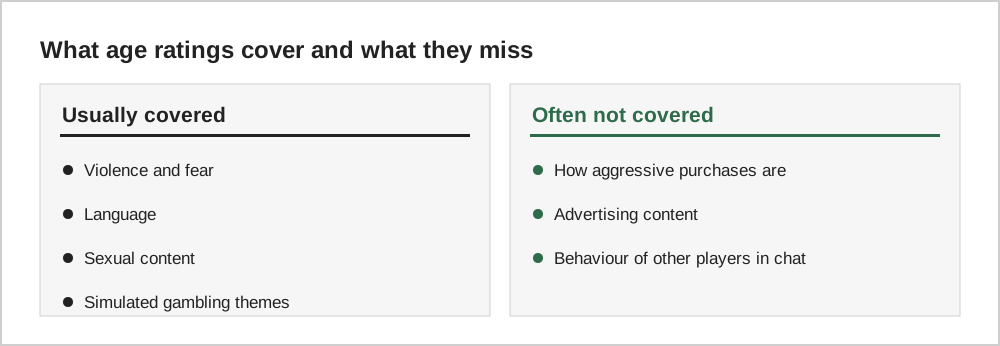
Ratings mainly cover content: violence, fear, language, sexual content, drug references and gambling themes. They also often include descriptors that explain why a game received its rating.
Interactive elements
Many ratings now include notices about interactive elements, such as "In-Game Purchases", "Users Interact" or "Shares Location". These are just as important as content descriptors, because they tell you about spending, chat and data, which content ratings do not cover.
Ads are a separate issue
Free games can show ads for other games or products. Advertising rules and the ads shown can vary, and ads are not always as tightly matched to the game's rating as the game itself. If ads are a concern, consider premium games without ads or subscription services, discussed in our guide comparing premium and free-to-play games.
Ratings are a starting point
Children mature differently, and families have different values. A rating tells you what a typical child of that age can handle, not what is right for your child. Playing a game briefly yourself, or watching your child play, is the best way to decide.
Ratings across regions
The same game can carry different ratings in different countries because each system uses its own criteria. A game rated 12 in one system might be rated Teen or 13+ elsewhere. App stores sometimes show their own age categories alongside official ratings, which adds another layer.
When in doubt, look at the descriptors rather than the number alone. Labels such as violence, in-game purchases or users interact explain what the rating is based on, and they are often more useful for deciding whether a game suits a particular child.
Checking a game yourself
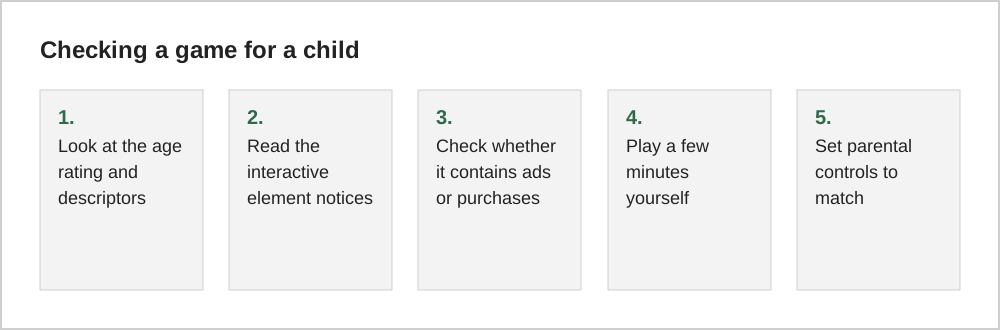
No rating replaces watching a few minutes of play. Trailers, gameplay videos from reputable creators and playing the opening yourself all show what a child will actually see. Pay particular attention to chat features and shop screens, which ratings describe only briefly but which often matter most to parents.
Common questions
Why does the same game have different ratings in different countries?
Rating systems reflect different cultural standards and legal requirements, so the same content can receive slightly different ratings in, for example, North America and Europe. IARC questionnaires produce the appropriate local rating for each region automatically.
Can a game's rating change after release?
Yes. If an update adds new content or interactive features, the developer may need to update the rating questionnaire, and the rating can change. Ratings can also be corrected if they turn out to be inaccurate.
The short version
ESRB, PEGI and IARC ratings mostly describe content, and Apple uses its own age bands. Read the descriptors and interactive notices, remember that ratings often say little about purchases, ads and chat, and combine ratings with your own judgment and the parental controls covered in our setup guide.